scribbling · build
PostHog on Expo, without the native plugin
No page views, no coordinates, nothing you didn't decide to send.
Whimsee sends 72 hand-written events to PostHog and no page views. It’s a GPS discovery app I built as a side project, and this is how its analytics work: no provider, no screen or touch autocapture, no session replay on mobile, and no PostHog native plugin.

Some of that is because Whimsee is an app that children can use in woods, and I’d rather under-collect. Some is because a store build once died on every device before JavaScript ran, and I don’t add native dependencies casually now.
The copyable version, pinned and typechecked against the versions Whimsee used, is in the repo.[1] It is a record of this setup, not a replacement for the current PostHog installation guide.
No PostHog native plugin
The current posthog-react-native SDK is written in JavaScript and uses native-backed Expo or React Native packages for storage and device context. PostHog’s current Expo instructions install expo-file-system, expo-application, expo-device and expo-localization alongside it.
Whimsee’s pinned setup is deliberately smaller:
| Package | Used here for |
|---|---|
posthog-react-native |
Client, queue, flags and event capture |
@react-native-async-storage/async-storage |
Persistent storage |
expo-constants |
App metadata already used elsewhere |
It does not install @posthog/react-native-plugin, which adds native features including mobile session replay and native crash capture. It also omits expo-file-system from the analytics setup and uses AsyncStorage instead.
That distinction matters. This is not literally a setup with no native modules: AsyncStorage and Expo packages are native-backed. It is a setup that adds no PostHog native plugin and is tied to the versions in the example repo. Check the current peer-dependency instructions before copying it into another app.
The caution comes from Whimsee 0.2.0 build 5. I added expo-image-manipulator for a photo cache, but it referenced symbols that the installed expo-modules-core did not export. The build died at launch before JavaScript ran. Typecheck and lint could not catch a native linkage failure.
For the pinned example, the install was:
npx expo install posthog-react-native @react-native-async-storage/async-storage expo-constants
Build the client so analytics can’t take down the app
Whimsee constructs the client directly rather than through <PostHogProvider> and wraps every call:
let client: PostHog | null = null;
if (KEY) {
  try {
    client = new PostHog(KEY, {
      host: HOST,
      persistence: 'file',
      captureAppLifecycleEvents: true,
      customAppProperties: { /* app name, version, os */ },
    });
  } catch (e) {
    console.warn('PostHog init failed:', e);
    client = null;
  }
}

type Json = string | number | boolean | null | Json[] | { [key: string]: Json };

export function track(event: string, properties?: Record<string, Json>) {
  try { client?.capture(event, properties); } catch { /* never throw into the app */ }
}
Record<string, unknown> looks like the obvious signature, but the pinned SDK expects serialisable values. The narrower type also stops a caller passing a Date to an event that should never contain one.
Client construction sets up storage and app-state listeners, so that gets a try too. Analytics is not worth a boot crash.
With the pinned SDK, captureAppLifecycleEvents: true captures events such as Application Opened, Backgrounded, Installed and Updated. Current versions enable lifecycle events by default, but I prefer the choice to be visible in configuration.
Events mark decisions and physical acts, not screens
Without the provider, Whimsee does not use touch autocapture. It also never calls posthog.screen(), so it sends no $screen events. All 72 product events are explicit track() calls.[2]
That is a trade. I lose automatic screen funnels and get an event stream where every product event was chosen. This matters when a screen name could reveal something about a person that I don’t need to collect.
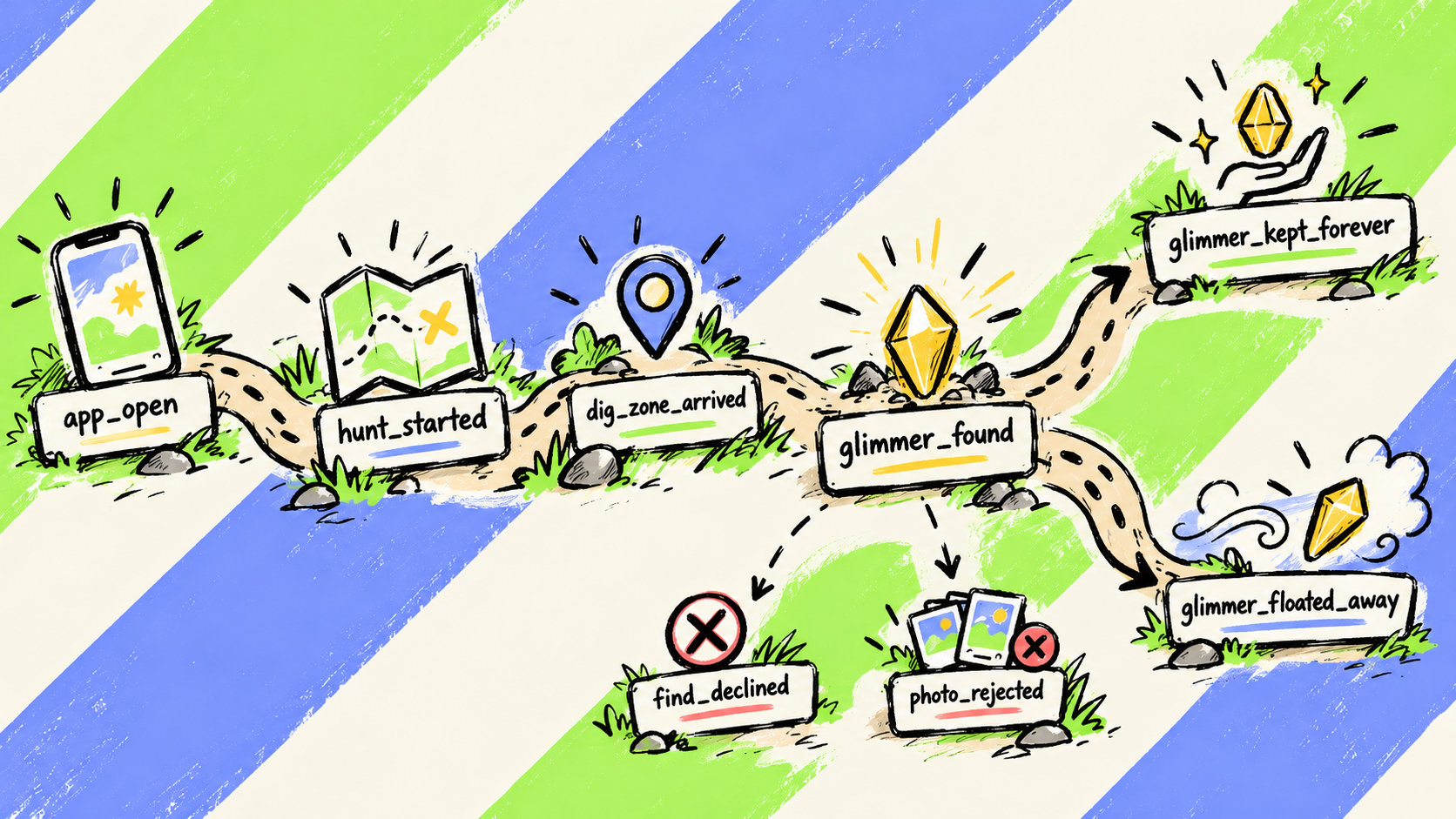
The rule is that an event marks a decision or physical act, not a screen someone looked at. A hunt produces events such as app_open, hunt_started, dig_zone_arrived, glimmer_found, and either glimmer_kept_forever or glimmer_floated_away. Planting is glimmer_hidden. Friction appears in events such as find_declined and photo_rejected.
photo_rejected has ten call sites because the photo rules are where people get stuck. In one 90-day period it fired twice against 80 successful photo glimmers, a rejection rate of 2.4%. Both refusals happened before photo_compression went live. Over the next five weeks, the app compressed 46 photos and refused none.
If you use Expo Router and want screen views, current PostHog guidance is to call posthog.screen() from the router integration. The provider can enable touch autocapture, but it does not make Expo Router screen tracking automatic.
Send a coarse area, never the coordinate
No Whimsee analytics event carries a precise coordinate. Events that need location carry area, a five-character geohash computed on the phone before the event is captured.
At Forest of Dean latitudes, that cell is roughly 4.9km north-to-south and 3km east-to-west.[3] It is still location information, and I treat it that way. It is enough to compare broad parts of the Forest without putting a precise trail point into analytics.
track('glimmer_found', { area: coarseArea(lat, lon), content_type, offline, again });
The event records the type of find and whether it happened offline. It does not contain the glimmer’s words, photograph or coordinates.
Fire the event when the action happens
I found an offline gap while auditing this setup.
A glimmer planted without signal goes into Whimsee’s own offline queue and syncs later. glimmer_hidden fired only after an immediate online insert. The offline branch queued the plant and returned, and the sync path fired no analytics event. Every plant made without signal was missing from the data.
The queued record also had no action timestamp, so firing at sync would have recorded the wrong time. The fix was to capture the event when the person acted:
await enqueue(item);
track('glimmer_hidden', { offline: true });
PostHog’s queue persists events while the device is offline and flushes them when it reconnects. Capturing at enqueue preserves the time of the action. offline stays a property rather than becoming a separate event, so both paths can appear in one funnel.
The hunt side raised a question I still cannot answer. glimmer_found fired 55 times in the same 90-day period, and every event explicitly had offline: false. Either people had signal when they found things or an offline path was unreachable. The dashboard cannot distinguish those explanations, so the finding remains unresolved.
persistence: 'file' means “choose storage”
The name is misleading. PostHog currently documents persistence: 'file' as selecting the best available storage, including supplied or detected storage implementations. It does not guarantee one literal file.
In Whimsee’s pinned SDK, the storage picker preferred expo-file-system when available and otherwise used AsyncStorage. Adding expo-file-system later therefore changed which backend the picker selected.
I did not observe an identity reset or queue migration directly. Source inspection showed the storage choice changing; it did not prove what happened to every existing device. The practical response is narrower: signed-in users are re-identified from Whimsee’s own session on launch, and the selected storage should be explicit if changing backends would matter.
Tell analytics which accounts are children
Whimsee has an age gate and child accounts. The is_child value already gated the interface in six places, but none of the six identify() calls sent it to PostHog. Analytics could not distinguish a child account from an adult one.
I now pass is_child as a person property. That makes it possible to exclude child accounts from an insight or audit whether they appear. It does not stop their events being captured, switch off profiling by itself, or make the service compliant with the ICO’s Children’s Code.
The broader protections still do the important work: no content in events, coarse rather than precise analytics location, no advertising SDK, pseudonymous identifiers and no mobile replay. The ICO standard also calls for high-privacy defaults and data minimisation. A filterable is_child property is one control, not the whole answer.
Who shouldn’t do this
- Anyone who wants screen and touch autocapture. Use the provider and configure it deliberately.
- Anyone who needs native crash capture or mobile replay. Those require the plugin omitted here.
- Anyone without a rule for what becomes an event. Hand-written instrumentation can look deliberate while measuring nothing useful.
- Anyone copying package lists without checking versions. This setup is pinned; the official Expo dependencies have changed.
What’s missing, on purpose
There is no session replay on mobile. Mobile replay requires the native plugin, but privacy is the stronger reason I left it out. A replay of the reveal screen could contain a glimmer’s words, and a replay of a child’s session would still be a recording of a child using the app.
The website does use replay to show whether people read the blog or leave. That is a product judgement, not proof that web replay is harmless.
For failed flows, Whimsee uses explicit events instead. plant_failed carries an error name, code and a 180-character message. Those fields were added after my sister’s gallery uploads failed and the event could only say that the glimmer had slipped away.
The other missing piece is readout. At the last audit, Whimsee had 72 designed events and one wired to a decision anyone was making: 1.4%.
In the 30 days to 15 September, 44.3% of hunts reached the next funnel stage and 5.1% reached dig_zone_arrived. That looks bad, but there were not yet enough glimmers in the ground for most hunts to end in a dig. The useful result was lower down: all four people who reached the dig zone revealed a glimmer and went on to decide whether to keep it. Median time from arrival to reveal was 30 seconds. The loss was in getting there.
I would still capture the events now rather than wait for more users. You cannot reconstruct the phone’s accuracy or whether an action happened offline months later.
Prompt I used for the audit: Read the analytics layer properly. What events do we capture and what’s the rule for what counts. What happens to an event for a glimmer planted with no signal. What does analytics do for a child user. Is session replay on, and if not was that decided or forgotten.
Whimsee is a free side project. Analytics are sent to PostHog’s EU Cloud.
notes
github.com/ookpassant/expo-min-setup. The repo contains the two-file example, its pinned versions and geohash reference values. Check those versions before treating the package list as current guidance. ↩︎
The count was 72 events at the time of the audit. The audit was Claude Code reading the repo; the decisions about what to change were mine. ↩︎
coarseArea(51.5074, -0.1278)isgcpvj, which is correct for London. A five-character geohash spans about 0.044 degrees in each direction; longitude degrees narrow with latitude, so the cell is not 4.9km square in southern Britain. ↩︎